SEE Final Revision & Practice Questions
Concise chapter-wise revision notes + SEE exam-style questions (very short, technical terms, full forms,short answers)
Chapter 3: Computer Security
1: Introduction to Computer Security
Definition: Computer security refers to the protection of data and information (stored or being transferred), computer programs, credentials, and computer hardware from intended harm, theft, unauthorized access, or unintended accidents/natural disasters.
Types:
- i. Information Security (InfoSec): Protection of print, electronic, or any other form of confidential and sensitive programs, data, and information from unauthorized access, use, misuse, disclosure, destruction, modification, or disruption.
- ii. Hardware Security: Protection of computer hardware from intended harm, theft, negligence, unauthorized access, or unintended accidents/natural disasters.
Discussion: Emphasize why security is crucial in today's digital world, especially for students handling school projects or online activities. Mention that threats can be physical (e.g., theft) or non-physical (e.g., cyber-attacks).
2: Major Principles of Information Security (CIA Triad)
- Confidentiality: Only authorized users can access the programs, data resources, and information.
- Integrity: Only authorized users should be able to modify programs and data when needed.
- Availability: Data and programs should be available to users when needed.
These principles form the foundation of InfoSec. For example, confidentiality prevents data leaks, integrity ensures data isn't tampered with, and availability keeps systems running during attacks.

3: Hardware Security
Focuses on protecting physical components from damage, theft, or environmental factors.
- i. Regular Maintenance: Keeps hardware in good working condition and corrects problems before severe damage (e.g., repairing a faulty CPU cooler to prevent microprocessor damage).
- ii. Insurance: Provides financial protection if hardware is damaged or stolen, allowing claims for economic support.
- iii. Power Regulating Devices
- UPS (Uninterruptible Power Supply): Battery-supported device that supplies power during main power failures, protecting against data loss and damage.
- Volt Guard: Provides constant output voltage during fluctuations from the source.
- Spike Guard: Protects against immediate voltage spikes.

Example of a modern UPS 
Example of a Voltage Stabilizer (Volt Guard type) 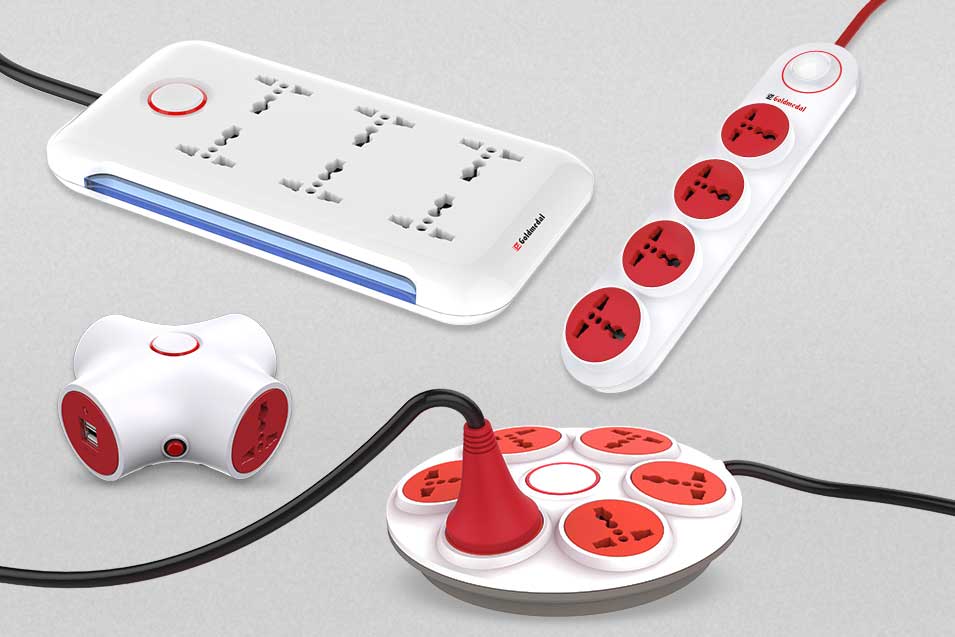
Spike Guard / Surge Protector Examples Why Needed? To prevent damage, expensive data loss, and unnecessary downtime from power issues — especially in areas like Nepal with unstable electricity.
- iv. Environmental Protections: (Dust-free cleaning, fire alarms/extinguishers, locks/CCTV, air conditioning at 21–24°C)
- Protection from Dust: Dust causes hardware failure; maintain a dust-free environment with regular vacuum cleaning.
- Protection from Fire: Caused by faulty wiring, overloads, or smoking; use fire alarms, detectors, doors, and extinguishers to minimize damage.
- Protection from Theft: Use lighting, grills on windows, safety locks, alarms, and CCTV.
- Air Condition System: Maintains room temperature (21°C to 24°C) and humidity to prevent overheating.


4: Information Security Threats (Malware & Others)
Definition: Threats that can harm computer programs, data, and information. Can be physical (e.g., theft) or non-physical (e.g., cyber-attacks).
Malicious Code (Malware): Code designed by cyber attackers to damage data/systems or gain unauthorized access. Includes viruses, worms, Trojan horses, spyware, etc. Functions: stealing, encrypting, deleting data, hijacking functions, monitoring activity.
5: Threats - Types of Malware (Part 1)
- Computer Virus: Executes itself and spreads by infecting other programs/files. Types: System/boot infectors, file infectors, stealth virus, macro virus, email virus.
- Worm: Self-replicates without a host program, spreads without human interaction.
- Trojan Horse: Appears legitimate but executes malicious functions after installation.
Computer Virus Example:

Computer Worm Propagation:
-768.webp)
6: Threats - Types of Malware (Part 2)
- Spyware/Adware: Collects data and observes user activity without knowledge.
- Rootkit: Hides in system areas, provides ongoing admin access while concealing presence.
- Ransomware: Encrypts files and demands payment for access.
- Keylogger: Records keystrokes secretly (hardware or software).
Victim → Phishing/Exploit → Infection → C2 Connection → Spread (Lateral) → Scan Files → Encrypt Files → Display Ransom Note → Payment Demand → (Pay or Not) → Attacker Decrypts (if paid)
7: Threats - Other Security Threats
- Hackers: Skilled experts using technical knowledge to overcome problems (types: white hat ethical, black hat malicious, grey hat mixed).
- Phishing: Attempts to obtain sensitive info (usernames, passwords, credit cards) via spoofed emails/SMS.
- Viral Web Sites: Insecure sites with malicious scripts (e.g., drive-by attacks exploiting not updated browsers/OS).
- Social Engineering: Manipulating people to divulge confidential info.
- Botnet: Collection of compromised devices controlled by a bot master via protocols like HTTP.
Phishing Attack:

8: Protection Mechanisms - Overview
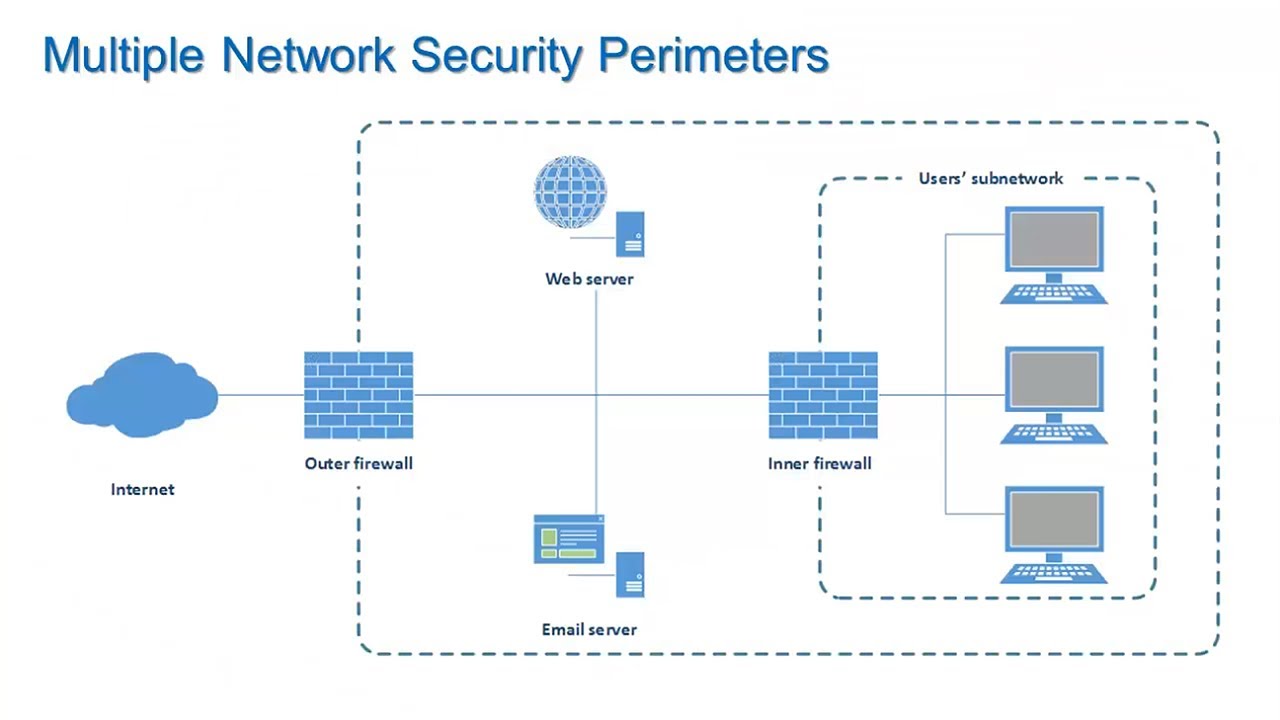
Definition: Designed to detect, prevent, or recover from attacks. Includes authentication, firewalls, cryptography, antivirus, and backups.
How to Protect from Infection: Use firewall/antivirus, avoid untrusted emails/links, regular backups.
8.1: Protection - Authentication System
Definition: Verifies identity to ensure only authorized access.
- Password: Secret characters for access; strong ones: not guessable (e.g., mix letters/numbers), change regularly, avoid popular words.
- Biometric: Unique human characteristics (e.g., fingerprints, face detection, retina, voice). Types: Behavioral (e.g., typing patterns), Physiological (e.g., fingerprints).
Compare passwords (easy but crackable) vs. biometrics (secure but hardware-dependent).
8.2: Protection - Firewall
8.3: Protection - Cryptography
8.4: Protection - Antivirus Software
8.5: Protection - Backup System
Definition: Creating duplicate copies of data/programs in secure locations to protect against corruption/loss.
Methods: USB flash drives, external hard drives, backup servers, cloud storage.
Discussion: Emphasize regular backups (e.g., to cloud or external drives) as a recovery tool.
Practice Questions for Computer Security Chapter (SEE Revision)
Section 1: Introduction to Computer Security
Very Short Questions
- What does computer security protect against?
- Name the two main types of computer security.
Technical Terms (Define in 1-2 sentences)
- Computer Security
- Information Security (InfoSec)
Full Forms
- CIA (in the context of Information Security)
- InfoSec
MCQs
- Which of the following is NOT a major principle of Information Security? a) Confidentiality b) Integrity c) Availability d) Accessibility
- Information Security protects data from: a) Unauthorized access only b) Misuse, disclosure, destruction, or disruption c) Natural disasters only d) Hardware failure
Fill in the Blanks
- Computer security refers to the protection of data, programs, and hardware from ________ harm, theft, or unauthorized access.
- The CIA principles stand for Confidentiality, ________, and Availability.
Short Questions
- Explain the CIA principles of Information Security with one example each.
- Differentiate between physical and non-physical security threats.
Activity: "CIA Triad Buzz": Find a good example for each (Confidentiality, Integrity, and Availability). You have 2 minutes to brainstorm real-life examples (e.g., a locked diary for confidentiality). Share and vote on the best example.
Answers
Very Short: 1. Intended harm, theft, unauthorized access, accidents. 2. Information Security, Hardware Security.
Technical Terms: 1. Protection of data, programs, credentials, and hardware from harm/theft/unauthorized access. 2. Protection of confidential/sensitive data from unauthorized access, misuse, or disruption.
Full Forms: 1. Confidentiality, Integrity, Availability. 2. Information Security.
MCQs: 1. d, 2. b.
Fill in the Blanks: 1. intended, 2. Integrity.
Short: 1. Confidentiality: Only authorized access (e.g., password-protected files). Integrity: Accurate modification (e.g., no tampering with exam scores). Availability: Data ready when needed (e.g., server uptime). 2. Physical: Stealing hardware; Non-physical: Virus attack via software.
Section 2: Hardware Security
Very Short Questions
- Name two power regulating devices.
- What is the ideal room temperature for computer hardware?
Technical Terms (Define in 1-2 sentences)
- UPS
- Regular Maintenance
Full Forms
- UPS
- CCTV
MCQs
- Which device protects against voltage spikes? a) UPS b) Volt Guard c) Spike Guard d) Air Conditioner
- Insurance in hardware security provides: a) Protection from dust b) Financial support if hardware is damaged/stolen c) Virus removal d) Data backup
Fill in the Blanks
- ________ particles can cause failure of hardware components, so keep the environment dust-free.
- Use fire alarms and extinguishers for protection from ________.
Short Questions
- List and explain three measures for hardware security from theft and fire.
- Why are power protection devices needed? Give examples.
Activity: "Hardware Hunt Game": Bring images of devices (UPS, Spike Guard, etc.) on the board or projector. Students race to identify and explain one in pairs.
Answers
Very Short: 1. UPS, Volt Guard, Spike Guard (any two). 2. 21°C to 24°C.
Technical Terms: 1. Uninterruptible Power Supply: Battery-supported device providing power during failures. 2. Keeping hardware in good condition to prevent severe damage (e.g., fixing CPU cooler).
Full Forms: 1. Uninterruptible Power Supply. 2. Closed Circuit Television.
MCQs: 1. c, 2. b.
Fill in the Blanks: 1. Dust, 2. fire.
Short: 1. Theft: Grills, locks, CCTV, alarms. Fire: Alarms, detectors, extinguishers. (Explain briefly). 2. To prevent damage from power issues; examples: UPS for backups, Spike Guard for spikes.
Section 3: Information Security Threats
Very Short Questions
- Name three types of malicious codes.
- What is a drive-by attack?
Technical Terms (Define in 1-2 sentences)
- Malware
- Phishing
- Keylogger
- Botnet
Full Forms
- HTTP (in botnet context)
- IoT
MCQs
- Which malware self-replicates without human interaction? a) Virus b) Worm c) Trojan Horse d) Spyware
- Social engineering involves: a) Hacking hardware b) Manipulating people for confidential info c) Encrypting data d) Backing up files
Fill in the Blanks
- A ________ virus infects system boot files.
- Ransomware ________ files and demands payment.
Short Questions
- Differentiate between a virus, worm, and Trojan horse.
- Explain how to protect a system from infection (list 3 ways).
Activity: "Threat Matching Relay": Write threats (e.g., Phishing, Rootkit) on cards and definitions on others. Students in teams relay to match them.
Answers
Very Short: 1. Virus, Worm, Trojan (any three from notes). 2. Spreading malware via insecure websites without user action.
Technical Terms: 1. Malicious code causing damage or unauthorized access. 2. Obtaining sensitive info by pretending to be trustworthy. 3. Records keystrokes secretly. 4. Network of compromised devices controlled by a bot master.
Full Forms: 1. Hypertext Transfer Protocol. 2. Internet of Things.
MCQs: 1. b, 2. b.
Fill in the Blanks: 1. boot/system, 2. encrypts.
Short: 1. Virus: Infects files/programs; Worm: Self-replicates; Trojan: Appears legitimate but malicious. 2. Use firewall/antivirus; Avoid untrusted emails/links; Regular backups.
Section 4: Protection Mechanisms
Very Short Questions
- Name two types of firewalls.
- What are the two main types of encryption?
Technical Terms (Define in 1-2 sentences)
- Cryptography
- Biometric Authentication
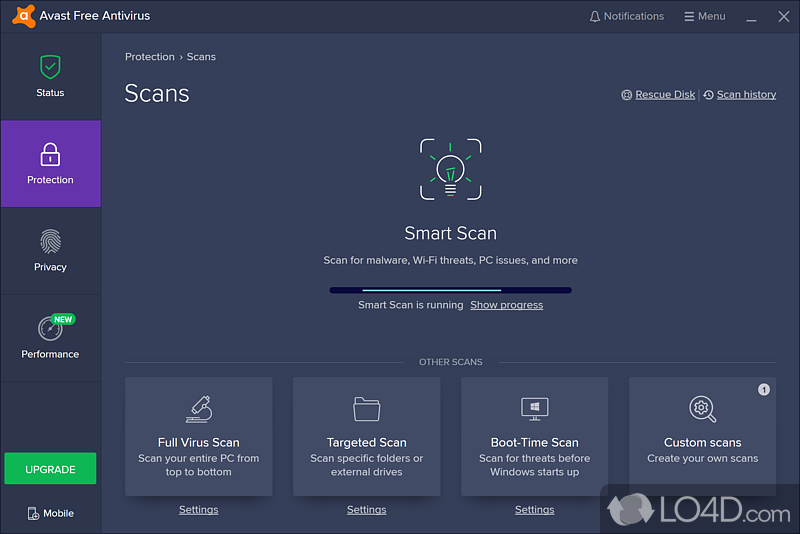
- Antivirus Software
- Backup System
Full Forms
- AES
- RSA
MCQs
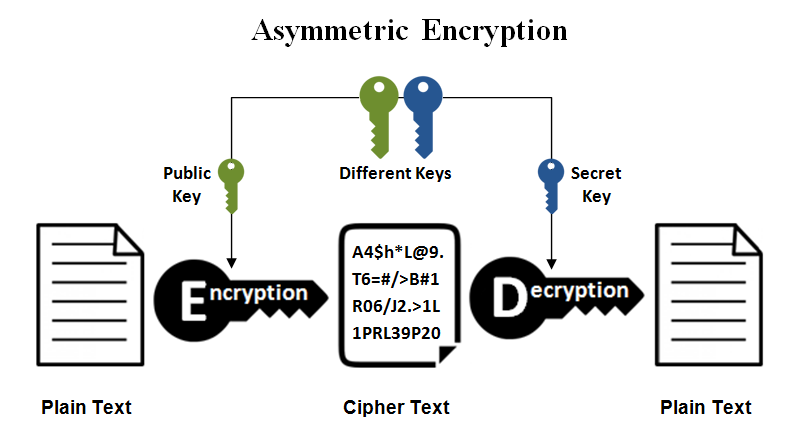
- In asymmetric encryption, the decryption key is: a) Public b) Private c) Symmetric d) Shared
- Which is NOT a biometric example? a) Fingerprint b) Voice recognition c) Password d) Retina scan
Fill in the Blanks
- Symmetric encryption uses ________ key for both encryption and decryption.
- A strong password should mix alphabets, numbers, and be changed ________.
Short Questions
- Explain symmetric vs. asymmetric cryptography with examples.
- List four criteria for a strong password and why backups are important.
Answers
Very Short: 1. Hardware, Software. 2. Symmetric, Asymmetric.
Technical Terms: 1. Securing communications via encryption/decryption. 2. Using unique human traits (e.g., fingerprints) for identity verification. 3. Detects/removes viruses/malware. 4. Creating duplicate data copies for recovery.
Full Forms: 1. Advanced Encryption Standard. 2. Rivest-Shamir-Adleman.
MCQs: 1. b, 2. c.
Fill in the Blanks: 1. one/same, 2. regularly.
Short: 1. Symmetric: One key (e.g., AES); Asymmetric: Public/private keys (e.g., RSA). 2. Not guessable, mix chars, change regularly, avoid popular words; Backups prevent data loss from corruption/attacks.
Note: This is the starting chapter for final revisions. More chapters will be added below in coming days.